Pay withyour palm.
Students pay at the canteen with a palm scan. Parents see every purchase, set the limits, and keep the school day running smoothly.
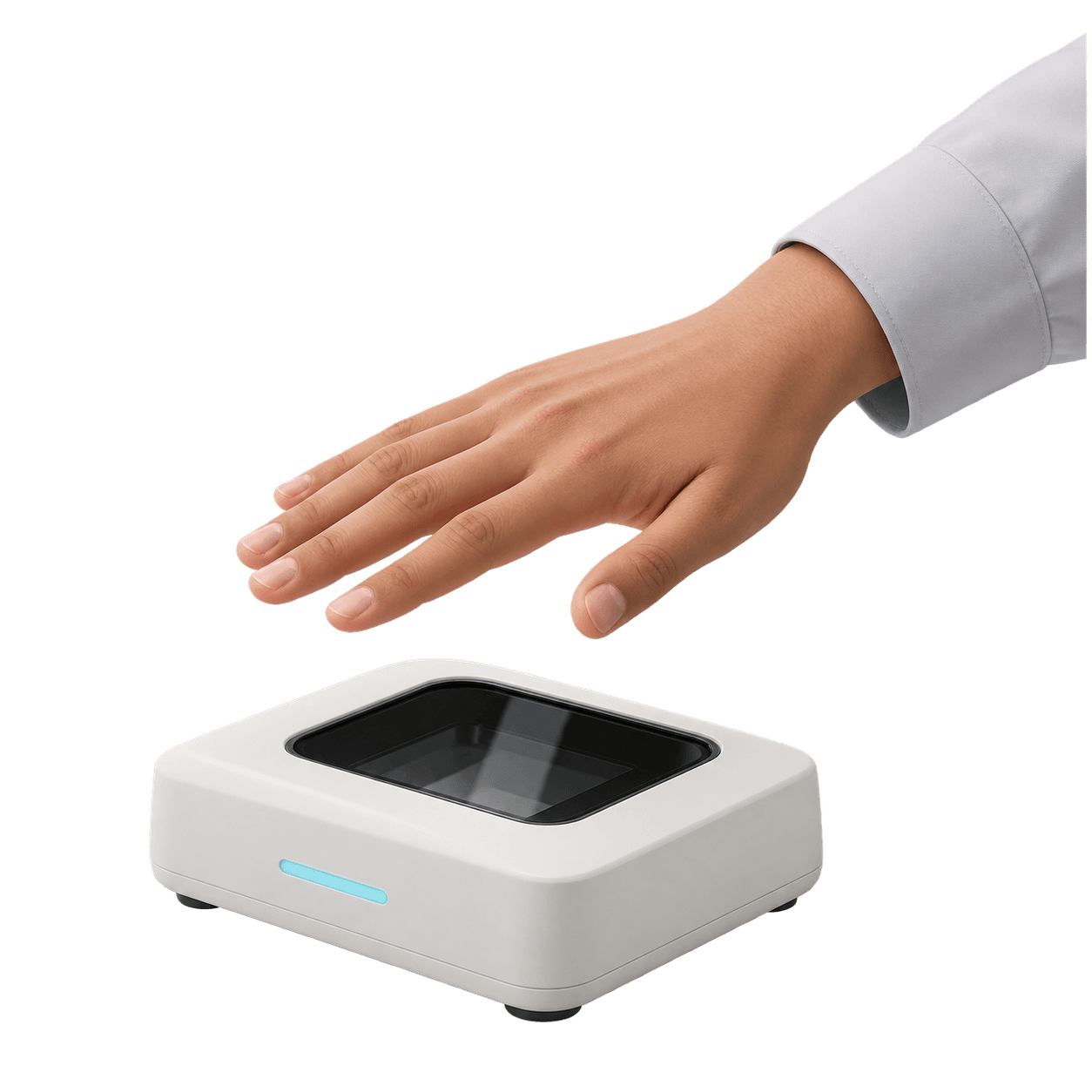
Payment approved
Sara · Canteen
SAR 6.50
- Hover your palm
- Payment approved
- Parent notified
No card.
No phone.
No cash.
Just a little more ease.
Trusted by schools, families and students.
- Schools trust Raha Pay
- 3
- Students paying with their palm
- 500+
- SAR in purchases handled
- 10K+
Supported by
Three steps. Nothing to carry.
Enroll once at school
A student registers their palm with the school reader. It takes under a minute.
Hover your palm at the canteen
The reader recognises the palm vein pattern and approves the purchase in about a second.
Parents see it instantly
A notification arrives with the child's name, the amount and the time.
A calmer canteen.
Today
Main canteen
Sales today
SAR 1846.50
Purchases
212
Refunds
SAR 12.50
Declined
6
Recent transactions
See allShorter queues
A palm scan takes about a second. Breaks become breaks again.
No cash handling
No change, no lost money, no end-of-day counting.
A dashboard for the canteen
Live sales and refunds, plus a daily close report with cash collected, exportable to Excel.
Easy setup
One reader per till, a short training and a simple enrollment day. We handle the rest.
You stay in control.
One wallet, one app, and every purchase in front of you as it happens.
Limits for each child
Set a daily allowance. Pause or resume payments whenever you need.
See every purchase
Instant updates and weekly insights show what each child spends.
One family wallet
One shared balance, with a separate spending limit for each child.
Designed for a quick glance.
The parent app and the canteen dashboard, as they are today.
Your balance, school top-ups, each child’s allowance and recent purchases.
Built to be trusted.
A simpler way to pay starts with clear boundaries around your family’s data.
Palm-vein recognition
The reader looks at the vein pattern beneath the skin, which is unique to each person and cannot be copied from a photo.
Biometric data never stored in the app
Palm templates live only on the school reader system in Saudi Arabia. The parent app holds no biometric data.
Built for Saudi PDPL
We collect the minimum, keep it encrypted with a trusted cloud provider and give parents clear rights over their data.
Built to work with licensed Saudi payment providers
Money movement is designed around payment providers licensed in Saudi Arabia. We never handle card details ourselves.
We are launching with our first partner schools in Saudi Arabia.
Join the pilot. We set up the readers, train the canteen team and run the enrollment day with you.
Join the pilotQuestions, answered plainly.
Is it safe?
Yes. The reader recognises the vein pattern under the skin, which cannot be copied from a photo or a print. Biometric templates stay on the school reader system, never in the app or on our website. Payments are processed by licensed providers.
What if a scan fails?
The student simply tries again. If the reader still cannot match the palm, canteen staff can look the student up by name and complete the purchase from the dashboard, with the same limits applied.
What does it cost the school?
We agree this with each school. During the pilot our aim is to keep the cost to the school as close to zero as possible.
What about children without enrollment?
Nothing changes for them. The canteen keeps accepting its usual payment methods alongside Raha Pay, and a student can enroll at any time.
Where is data stored?
Palm templates live only on the school reader system in Saudi Arabia. Account, wallet and transaction data is encrypted in transit and at rest and handled in line with the PDPL. It is currently hosted by our cloud provider outside the Kingdom, and we are moving it to servers inside Saudi Arabia.
How do parents top up?
During the pilot, parents top up at the school and the amount appears in the app instantly. Card and Apple Pay top-ups in the app will follow after the pilot.